Kanban your agent can work.
A small, fast kanban board for small teams - with an MCP server, so Claude can read the board, write cards and move them. Free in beta, no credit card.
- Free in beta
- No credit card
- No feature gates
- MCP server included
What it is
What Noeto is
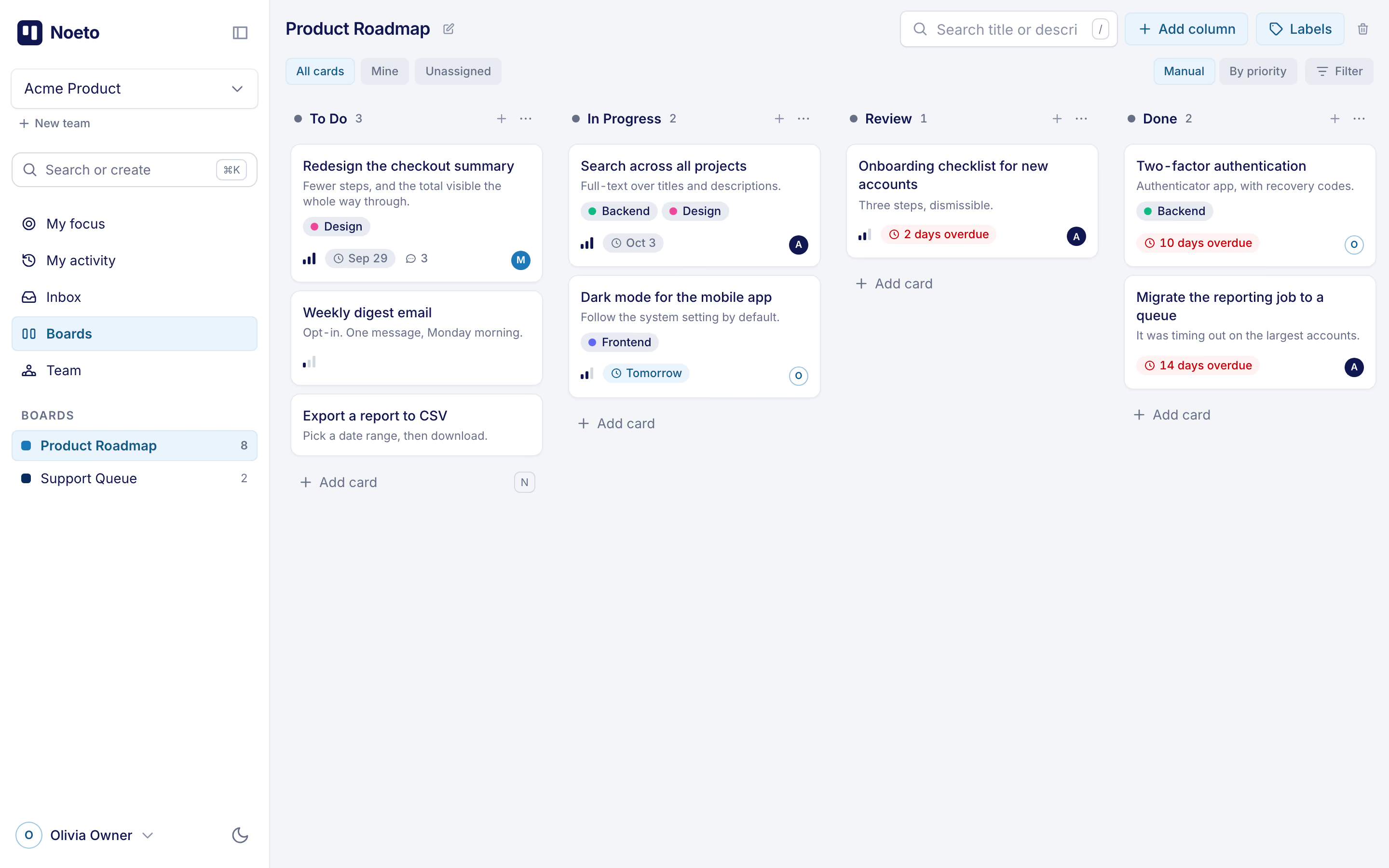
Noeto is a kanban board for small teams: boards, columns and cards, and the few things around them that make a board worth opening every morning - your own list of what is due, an inbox for what concerns you, and a search that also writes cards. It comes with an MCP server, so an AI assistant can keep the board current alongside you.
It’s for the teams a heavier tool talks over - a handful of developers shipping a product, a department tracking its own work inside a larger company. You set up a board in minutes and it stays legible, because there is nowhere for complexity to hide: no nested workspaces, no epics inside epics, no view you have to configure before the board looks right.
Noeto is not a project-management suite and not a platform you extend until it becomes one. It’s a board that does the board well - see what you get for exactly where that line is drawn.
What you get
What you get
Boards & columns
6- Drag cards between columns and reorder them, with a mouse, a trackpad or a finger - and Undo on every move and delete
- Views one click away - All cards, Mine, Unassigned - plus filters by people and labels you can save, and every view is a link you can send
- Sort a board by priority without rearranging it for anyone else
- Mark where work starts and where it ends; finished cards stop counting as late
- A work-in-progress limit per column that warns, never blocks
- A column can hand every card that lands in it to someone, and move cards nobody touched for a week on to the next step
Cards
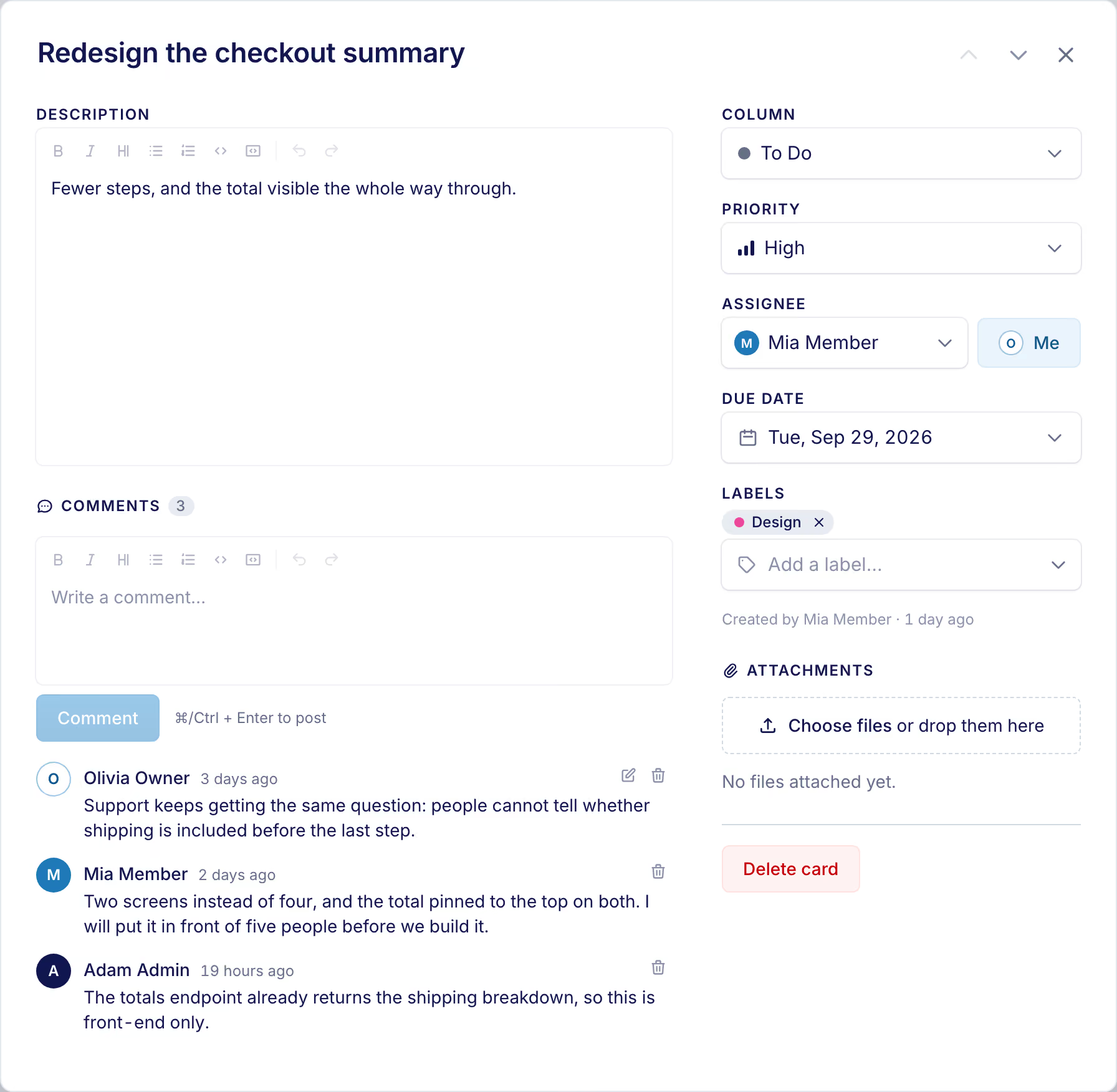
6- A Markdown description and comments, with @mentions, emoji and code blocks
- One assignee, a priority, and a due date said the way you would say it - Today, Tomorrow, “2 days overdue”
- A tile that tells you when a card has sat untouched for a week, or is waiting on someone it was handed to
- Labels in your own colours, and who created the card and when
- Files attached straight to storage; images and documents open in place, the rest downloads
- Open a card beside the board and step to the next one with the arrow keys
Your work
5- My focus - everything assigned to you across every board, late first, then what is waiting on you, then this week
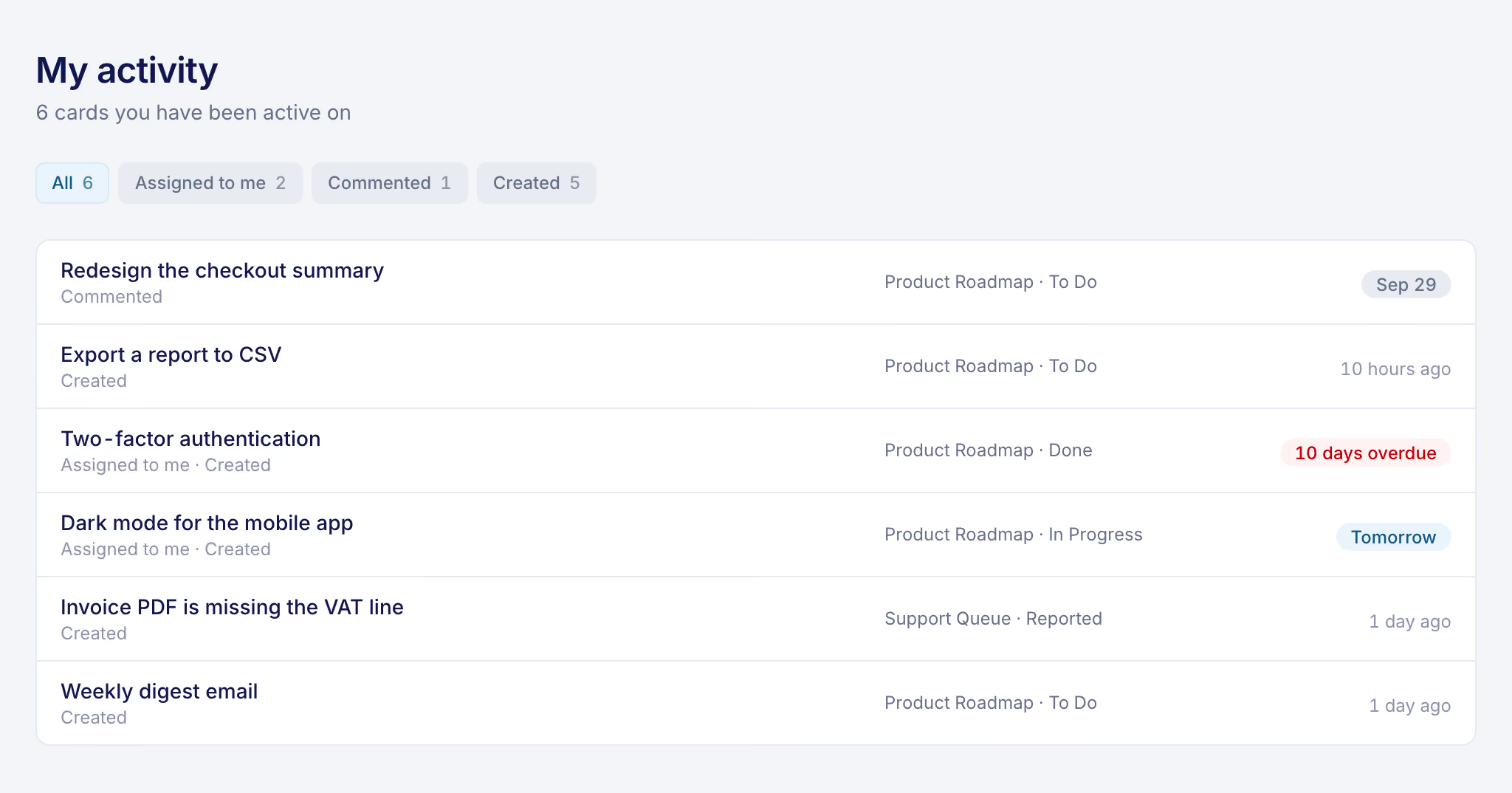
- My activity - every card you have ever been assigned, created, commented on or been mentioned in, finished ones included
- Inbox - the mentions, comments and hand-overs meant for you, whether or not email is on
- ⌘K finds any card or board, and writes a new card from one line:
Fix login @anna #bug !high fri - Keyboard all the way:
Nfor a new card,/to search the board,[to fold the sidebar away
People & teams
6- Any number of teams per person, and one switch between them
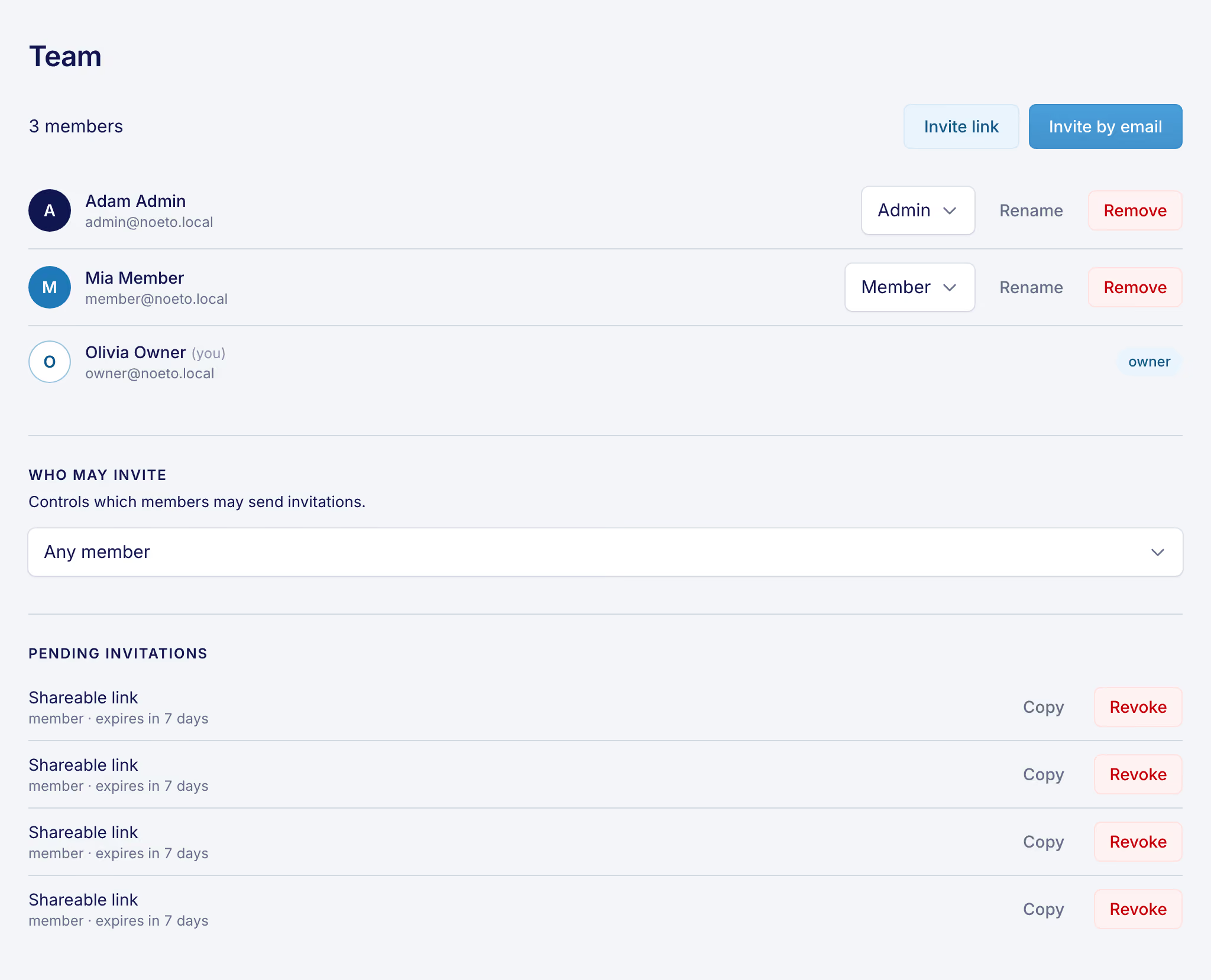
- Three roles - owner, admin, member - each with a clear ceiling on what it can do
- The last owner can’t be demoted or removed, and nobody can change their own role
- Invite by email, or by a link that always joins as a member, so a leaked link can’t hand out admin
- Invitations expire after seven days; revoking one takes effect immediately
- A name per team, so the same person can be “Anna” in one and “Anna (design)” in another
The app itself
5- Email when a card is assigned to you, when someone comments on a card you’re on, or mentions you - each switchable off on its own, in settings
- Push notifications on the installed phone app
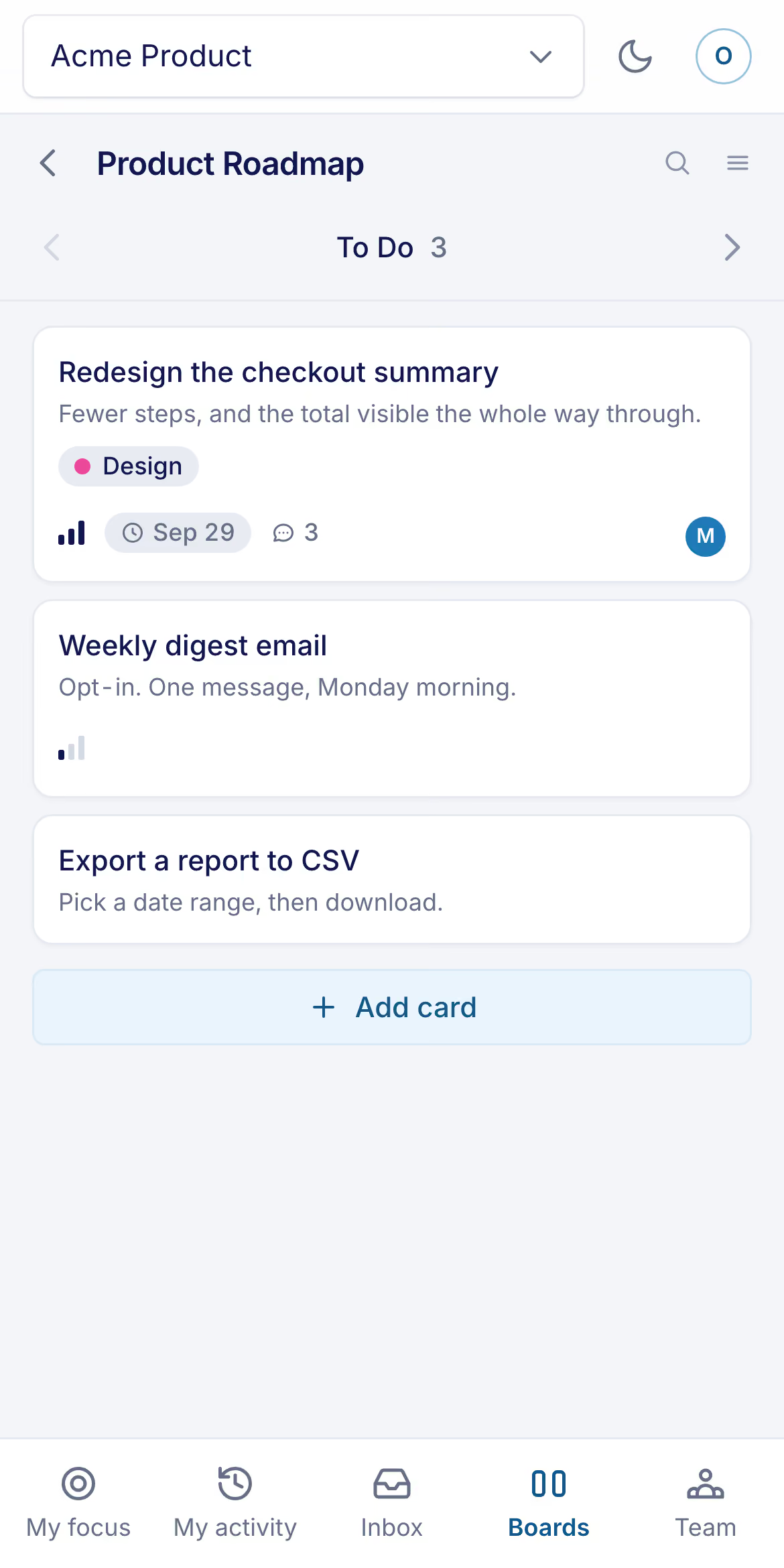
- Installable as a PWA, with an offline app shell
- Light and dark, in English and Czech
- No email-verification loop between you and a working team, and no per-seat pricing to work out first - see what it costs
What Noeto deliberately does not have
6- Sprints or velocity charts
- Time tracking
- A rule builder for workflows
- Custom fields
- A plugin marketplace
- Per-seat pricing today
Every one of those is a decision, not a backlog item.
AI agent
A board an agent can work
Noeto ships an MCP server. MCP - the Model Context Protocol - is the standard an AI assistant uses to reach a tool outside itself, so pointing Claude Code, Claude Desktop or any other MCP client at your board takes one block of JSON and an access token.
What that buys you is the half of a board nobody enjoys keeping current. Ask what is assigned to you and get the answer without opening a tab. Finish a piece of work and say so, and the card moves to Done. Hit a bug mid-task and have it written up as a card, in the right column, with a label and a description longer than the one you would have typed yourself.
It reads boards, searches across all of them - by assignee, label, priority, due date, or what is overdue - creates and edits cards, moves and reorders them, and comments as you. It deliberately cannot delete anything, cannot create boards or columns, and cannot leave the team its token belongs to: a card in the wrong column is recoverable, and setting a board up is a decision that shouldn’t be taken from a sentence. The token is an ordinary access token, scoped to one team and revocable from settings, so the agent reaches exactly as far as you do and no further.
The full tool list and the setup block are in the AI agent documentation; access tokens covers what one can reach. None of this is a plan or an add-on - it is in the same free beta as everything else on this page.
Security
How teams are kept apart
A team’s boards, cards, comments and files are visible to that team’s members and nobody else - and the app never takes your word for which team you are in. It reads that from your signed session, not from anything your browser sends.
Membership is checked on every request rather than remembered, so removing someone from a team takes effect on their very next click, not when their session happens to expire. Ask for another team’s board or card and the answer is “not found”, the same as for one that doesn’t exist - there is no way to find out what ids are in use. Underneath, every query on team data filters by team, and a check in the build flags one that doesn’t.
Attachments are private files, opened only through links that expire within the hour; there is no public address for any of them. Files a browser would run as a page - SVG, HTML - always download instead of opening in a tab.
None of this adds up to a compliance program: there’s no SOC 2 report, no penetration test and no DPA yet. Noeto is a beta, and if you need those, it is too early for you. The privacy page says what this site itself collects.
Pricing
What it costs
Noeto is in beta and free to use. No credit card, no trial timer, no feature gates.
That won’t be true forever - a product with running costs and no revenue isn’t one you can rely on, so paid plans will exist eventually. If and when they do, teams already using Noeto will get notice before anything changes for them, and there will be a free tier that stays genuinely useful at the size of team Noeto is built for. There’s no price list today, because there’s no price.
Questions
Questions
How much does Noeto cost?
Noeto is free during its beta, with no credit card, no trial timer and no feature gates. Paid plans will exist eventually, because a product with running costs and no revenue isn’t one to build on - but existing teams will get notice before that happens, and a free tier is planned to stay useful at this team size. There’s no price list today because there’s no price.
Will Noeto notify me when something happens?
Yes, but only about things that concern you: a card assigned to you, a comment on a card you’re the assignee of or have commented on, and an @mention anywhere. Each of those lands in your in-app Inbox, and by default also as an email; each of the three can be muted on its own in settings. There is no daily digest and no notification for every change on a board - My activity is where to look back over everything you have had a hand in.
Two kinds of mail aren’t switchable: an invitation, which is addressed to someone who may not have an account yet, and a notice that your role in a team changed - an app that lets you mute that leaves you unable to explain why a button disappeared.
Push notifications need the installable app at pwa.noeto.online and the browser’s own permission, which it asks for once, on that device. They carry the same card events. The browser you signed into at app.noeto.online has no service worker and receives no push - see is there a mobile app.
Who is Noeto for?
Noeto is for small teams that want a board and nothing else: a handful of developers shipping a product, or a department inside a larger company tracking its own work. Everyone can see what’s in flight at a glance, and each person gets their own view of what’s theirs. If your team already needs sprints, time tracking or a workflow rule builder, a heavier tool will serve you better - see what Noeto deliberately does not have.
Can an AI agent use my board?
Yes - Noeto ships an MCP server, so Claude Code, Claude Desktop or any other MCP client can read your boards, search them, create and edit cards, move them between columns and comment as you. It cannot delete anything, cannot create boards or columns, and is confined by its access token to one team. Setup is a token from settings and one block of JSON: see the AI agent documentation. It’s included in the free beta, not a paid add-on.
How are teams kept apart from each other?
Which team you are working in comes from your signed session, never from anything your browser sends, and your membership is re-checked on every request - removing someone takes effect on their next click. Another team’s boards answer “not found”, exactly like ones that don’t exist. See how teams are kept apart for the rest, including what Noeto does not have yet.
Can I export my data?
Not yet - there’s no export feature today, and this page won’t claim one that doesn’t exist. Every board, card, comment and attachment stays exactly where you put it, readable through the app for as long as your team uses it, but there is no button to download it all as a file yet.
What happens to my data?
Your data stays in a database that’s backed up daily to a separate, write-only store the application itself can’t read from or delete. Noeto is a beta without a formal retention or deletion policy yet, so if you need contractual guarantees around data handling, ask before you rely on it - see how teams are kept apart.
Is there a mobile app? Does it work offline?
There’s no native mobile app, but Noeto installs as a PWA on a phone’s home screen, with an offline app shell so the interface loads without a connection. Open pwa.noeto.online on the phone - that address is the installable build, and it is the one to add to a home screen. On Android it offers to install itself; on an iPhone no browser can, so it tells you where Safari’s own Add to Home Screen lives instead of pretending there’s a button.
Once installed it can also deliver push notifications, if you allow them. Your boards themselves still need a network to load and update, on purpose - nothing here pretends to work offline when the data can’t.
Can I self-host Noeto?
No - Noeto is only available as the hosted service at app.noeto.online, and there’s no packaged self-hosting option today. Everything runs from a single managed deployment, which is part of how the team keeps it free during the beta.
How do I invite people to my team?
Send an email invitation or share an open invite link, both from your team’s settings once you’ve signed in. An email invite can carry the member or admin role, but a shareable link always joins as a member no matter how it’s configured, so a leaked link can never hand out admin. Invitations expire after seven days, and revoking one takes effect immediately.
What does Noeto not do?
Noeto has no sprints or velocity charts, no time tracking, no rule builder for workflows, no custom fields, no plugin marketplace, and no per-seat pricing today. Every one of those is a decision, not a backlog item - see what you get for the full list of what’s in instead.
Get started
Start a board
Create a team, make a board, and put your first card on it - it takes less time than reading the rest of this page. Free in beta, no credit card required.